
Ai-assisted Tree Species Identification
If you’ve ever stood in a forest and wondered what tree you’re looking at, you’re not alone. I’ve found myself squinting at leaves and bark, trying to guess species, and honestly, it’s not always easy. Thanks to AI-assisted tree identification tools, that confusion is finally getting easier to solve. These apps and platforms use artificial intelligence to help people identify trees, whether you’re taking a walk in the park or working on a biology project. Here’s what you need to know about jumping into AI-assisted tree species identification.
How AI-Assisted Tree Identification Works
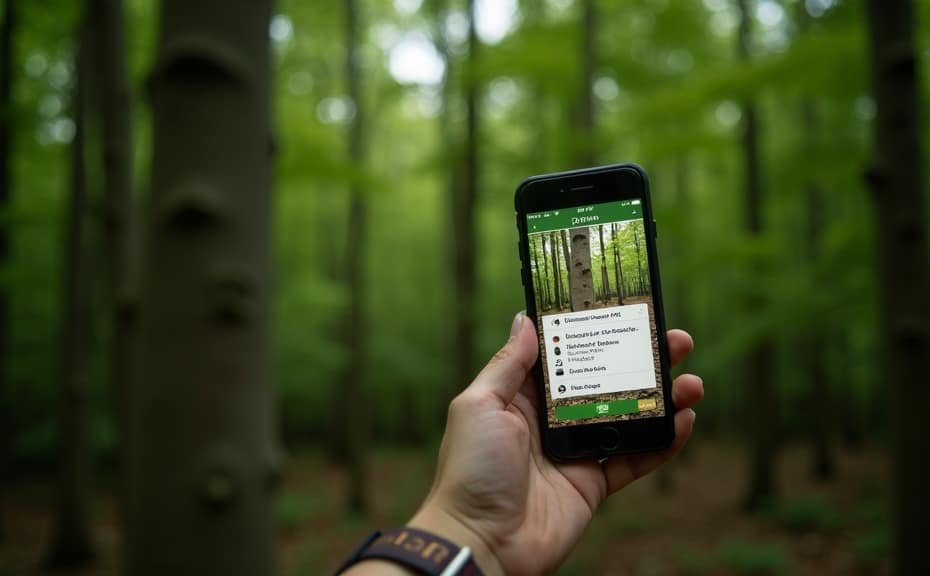
AI-powered plant ID tools have come a long way. The process is surprisingly straightforward for users, but there’s seriously smart tech at work under the hood. Most apps or online platforms use your phone or camera to snap a photo of a tree’s leaf, bark, or even the whole tree structure. Then, artificial intelligence analyzes features like shape, vein patterns, and even the surrounding environment to compare what you see against huge plant image databases. The app serves up possible matches with names, pictures, and sometimes a confidence rating for its guess.
This tech isn’t just for hobbyists. Botanists, forestry workers, students, gardeners, and just about anyone outdoorsy can get a lot out of it. Image recognition keeps getting better as more data is processed, and many apps crowdsource images from around the world. This helps improve accuracy for everyone over time. PlantNet and iNaturalist, for example, use community-verified results to help confirm tree identifications, which also means the AI keeps learning from real people out in nature.
Popular AI-Powered Tree Identification Apps
I regularly see more AI-powered apps popping up, but a few have become pretty popular and reliable. Here are some worth checking out if you want to take your phone on your next hike:
- iNaturalist: Combines AI with a huge global community. Great for getting confirmations from real experts and keeping a record of your nature finds.
- PlantNet: Focused on plants and trees, with plenty of region-specific databases. Perfect if you want strong accuracy for local flora.
- Seek by iNaturalist: Designed for beginners and families, this app uses your camera in real time to offer quick IDs and nature activities for curious minds.
- LeafSnap: Developed by researchers partnering with educational institutions, this one is strong in tree identification through leaves and bark.
Each app has its own strengths, so your choice might depend on whether you want field guides, expert verification, or just quick answers on a walk. Some even let you share your findings with a community for discussion and learning, which adds a fun social element to nature walks.
Get Started with AI Tree ID Tools
Jumping into AI-assisted tree identification is easy, but a few basics help you get the most accurate results right from the start. Here are some practical tips:
- Take Clear Photos: The AI is looking for details in leaves, bark, and fruit. Try to capture sharp images in good natural light. Shadows and blur can really trip up the AI, so take your time if you can.
- Angle and Focus: If possible, photograph healthy leaves against a simple background (your hand works in a pinch). Make sure the photo is focused so major features like edges and veins stand out.
- Use Multiple Photos: Some apps allow or even ask for leaves, bark, and flowers or fruit. The more details you share, the more accurate the result usually is. Different angles or parts can help the AI avoid mistakes.
- Location Services: Turning on location while using the app helps AI filter out unlikely matches and improve accuracy for your region. Many tree species are very region-specific, so this one step can make a big difference.
Most AI-powered plant ID platforms have short tutorials or pop-up tips that walk you through the process. It really is designed for anyone and works even if you’re not a tech expert! If you’re ever in doubt, just ask within the app or community for extra guidance.
Challenges and Limitations You Should Know
AI and plant presses don’t always see things the same way, and these apps aren’t perfect. Here are some of the most common hiccups I’ve run into out in the field:
- Similar-looking Trees: Some trees are tough to tell apart, even for botanists. Oak and beech leaves, for example, can confuse most AI if the image quality isn’t great.
- Photo Quality: Poor lighting, blurry shots, or partial leaves make it tough for AI to do the job well. Sometimes, you’ll get several possible matches instead of one clear answer.
- Regional Data Gaps: If you’re in a less documented area or using an app built for a different continent, the database might not have your local species. This can lead to random matches or no result at all.
- Unusual Trees: Ornamental or hybrid species often aren’t in the main databases. AI can’t always provide the right identification for unique garden trees or new cultivars, so you might have to do extra research.
Despite these bumps, I’ve had pretty good luck overall, especially with the major apps. It’s worth remembering that a bit of patience and checking multiple sources will always work in your favor, especially for trickier trees.
Photo Quality
Getting good photos is really important. Too much sun, dark shadows, rain, or heavy wind can ruin your shot and make the AI’s job harder. If you’re stuck with tough conditions, try snapping several photos from different angles. The more you give the app to work with, the better the odds you’ll get a reliable ID.
Database Coverage
Most major plant ID platforms keep building their databases from user submissions and partnerships with botanic gardens and research institutions. If your app mentions a smaller database for your area, switching to a globally-focused app like iNaturalist might help you spot more local trees.
Community Verification
Some platforms have volunteers or professional botanists who check identifications. These extra layers of verification are super useful. If you’re ever in doubt, uploading your find to an app’s community or checking a local flora guide will often get you the confirmation—or corrections—you need.
Being aware of these challenges means you’ll be better prepared out in the wild. The AI keeps getting better, but your own observation skills and a touch of patience can take you even further.
Tips for Making Tree Identification Even Easier
If you’re hoping to get consistent, reliable results or just want to have more fun with tree spotting, there are a few tricks I recommend:
- Photograph All Parts: Try to get images of leaves, bark, branches, and, if in season, flowers or fruit. This gives AI more clues to work with and increases accuracy.
- Seasonal Considerations: Some trees look totally different throughout the year. If you want the best odds, snap photos when leaves and fruit are healthy and easy to spot. Spring and summer tend to be best, but bark and buds can help in winter.
- Keep Records: Most apps let you save your identifications, which is handy for learning as you go or tracking locations for future reference. You might notice patterns in where certain trees grow over time.
- Learn Basic Botany: Understanding the difference between leaf shapes, like lobed versus serrated, and bark types helps you both with and without the apps. Even a few minutes reading about local tree species will give you a real edge.
- Respect Local Laws: A few places protect rare trees by law. If you’re using tree ID for research or business purposes, make sure you’re following best practices for local data collection and nature conservation. Not only is it respectful, it keeps you out of trouble too.
I started out using AI just for the fun of it, and it’s made my time outside a whole lot more interesting. Over time, you’ll start recognizing species without needing to snap a photo every time. It really is a skill—and with AI as backup, you can learn fast.

Tree ID Tools in Action: Real-World Uses
AI-powered tree identification isn’t just a cool hobby tool. Here are some places I see it getting real-world use:
- Education: Teachers and kids use these apps for field trips, nature walks, and hands-on science lessons.
- Forestry and Conservation: Forestry workers and researchers use AI to record tree populations, monitor tree health, and spot invasive species sooner.
- Urban Planning: City planners and arborists use tree identification data to manage and track urban trees, plan green spaces, and improve city air quality. With more trees documented, planning future parks and green initiatives gets easier.
- Citizen Science: Everyday people can contribute observations that researchers use to map species distributions and track the effects of climate change. Even casual users can make a difference just by sharing what they see.
Even if you’re just using the tech out of curiosity, your contributions can help a researcher or conservation project. Most platforms make it easy to share data with scientific initiatives, making the whole process more rewarding for everyone involved.
Frequently Asked Questions
Here are some common questions I’ve seen about AI-assisted tree identification tools:
How accurate are AI tree ID apps?
Most accurate results come when you provide clear, focused photos of healthy examples. Mainstream apps tend to be pretty reliable for common species but might struggle with hybrids or rare trees.
Can AI apps identify trees just from a picture of bark or a bare branch?
Some AI tools can handle bark photos, but results are better with leaves or flowers present. In winter, identification can be tricky, but apps that use multiple photos and request location data tend to do better.
Is it safe to use location services with these apps?
Location data helps filter potential tree species by habitat. Most reputable apps handle your info privately, but you can always check the privacy policy if you’re unsure.
Are there offline options?
Some apps let you download plant databases for remote use, but you’ll need to check individual app details to see if this feature is included.
Final Thoughts on AI Tree Identification
AI-assisted tree identification takes the guesswork out of exploring the outdoors. With just a smartphone and a bit of curiosity, learning about local trees becomes quicker and way more accessible. Whether you’re a student, casual hiker, or working professional, there’s probably an app or platform that fits your needs and experience level. As AI continues to improve, tracking down which tree you’ve been looking at has never been more convenient—or as much fun.
Botanicus Plus a GPT for starters and experts
Botnicus Plus boasts an array of new features, enhancing its global appeal and user interaction. These include: 1) Multilingual Support for accessibility in various languages. 2) Virtual Tours of famous botanical gardens and historical plant sites. 3) A Botanical Identification Tool for users to upload and identify plants. 4) Seasonal Guides and Tips tailored to local climates and regions. 5) Opportunities for users to engage in Collaborative Projects and Citizen Science Initiatives. 6) Advice on Sustainable Gardening Practices. 7) Interactive Q&A Sessions with botany experts. 8) Personalized Plant Care Reminders for gardeners. These features enrich Botnicus Plus’s mission to provide comprehensive, interactive, and culturally rich botanical education, fostering a deeper connection with the natural world.
Enjoy!👒
Invest in your future
Take time to learn
Embark on your journey in affiliate marketing and website creation alongside an incredible community and myself. Invest in your future by dedicating time to learn and earn. Take all the time you need to master the basics before aiming higher. Give it a try and sign up for free. You won't regret it! Discover the possibilities for yourself...